
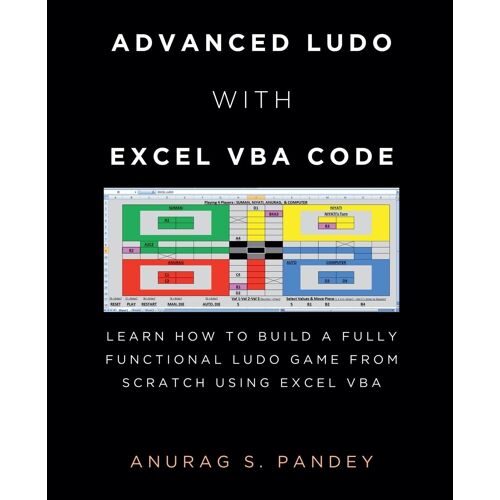
Advanced Ludo with Excel VBA Code: Learn How to Build a Fully Functional Ludo Game from Scratch Using Excel VBA -
- Format: Broché Voir le descriptif
Prix conseillé 29,99 €
Qu'est-ce que le prix barré ?
C'est le prix de vente conseillé par le fabricant ou l'importateur du produit.
En savoir plus27,58 €
Produit Neuf
- Livraison à 0,01 €
- Livré entre le 26 août et le 11 septembre
Brand new, In English, Fast shipping from London, UK; Tout neuf, en anglais, expédition rapide depuis Londres, Royaume-Uni;ria9798230867968_dbm

- Payez directement sur Rakuten (CB, PayPal, 4xCB...)
- Récupérez le produit directement chez le vendeur
- Rakuten vous rembourse en cas de problème

Gratuit et sans engagement
Félicitations !
Nous sommes heureux de vous compter parmi nos membres du Club Rakuten !
TROUVER UN MAGASIN
Retour
Avis sur Advanced Ludo With Excel Vba Code: Learn How To Build A Fully Functional Ludo Game From Scratch Using Excel Vba de ... - Livre 12 ans et +
0 avis sur Advanced Ludo With Excel Vba Code: Learn How To Build A Fully Functional Ludo Game From Scratch Using Excel Vba de ... - Livre 12 ans et +
Les avis publiés font l'objet d'un contrôle automatisé de Rakuten.
-
English Grammar In Use - With Answers
8 avis
Occasion dès 13,94 €
-
Canzoniere Facilotto
Neuf dès 27,99 €
-
Mauvais Garçons - Portraits De Tatoués (1890-1930)
4 avis
Neuf dès 35,00 €
Occasion dès 33,25 €
-
Méthode Audio Espagnol Débutant - 7 Cd Audio
3 avis
Occasion dès 22,90 €
-
L'odyssee, 'poesie Homerique', Tome Iii, Chants Xvi-Xxiv
1 avis
Occasion dès 30,90 €
-
Manuel On Your Marks Anglais Belin 5e 2026
Occasion dès 15,00 €
-
Mastering Pot-Limit Omaha
Neuf dès 35,70 €
-
Frisch Gewagt ! L'allemand En Classe De Troisième
Occasion dès 15,00 €
-
Pop Impressions Europe/Usa: Prints And Multiples From The Museum Of Modern Art
Occasion dès 18,00 €
-
¡ Adelante !, 2e Annee D'espagnol A L'usage Des Classes De 3e A Et B
Occasion dès 20,90 €
-
Mark Twain, Mississippi Writings
Neuf dès 39,02 €
Occasion dès 15,00 €
-
Drizzle
Neuf dès 25,00 €
Occasion dès 23,75 €
-
Bikablo 2.0
Occasion dès 35,27 €
-
Cognitive Chess
Neuf dès 30,28 €
-
Design As Art
2 avis
Neuf dès 27,07 €
-
Le Theme Litteraire Espagnol 48 Textes Traduits Et Commentés
2 avis
Occasion dès 17,70 €
-
Bepc - Brevet D'etudes Du Premier Cycle - Espagnol - 1958 Fascicule 5 - Annales Vuibert
Occasion dès 16,95 €
-
Poster Weltkarte Petersprojektion, Up-Side Down Englisch (Ca. 82,5 X 52,3 Cm)
Neuf dès 27,74 €
-
Ragtimes - Band 1 (1899-1906)
Neuf dès 18,89 €
-
Annales Corrigées Du Concours Enac Gsea/Tseeac
Occasion dès 31,50 €
Produits similaires
Présentation Advanced Ludo With Excel Vba Code: Learn How To Build A Fully Functional Ludo Game From Scratch Using Excel Vba de ...
- Livre 12 ans et +

Résumé :
This book contains over 1900 lines of code and easy instructions to create a Ludo board game. This book not only helps in developing Ludo game but is also a source to learn coding, logic building and Excel VBA. Students in class six and up, including those pursuing BCA and MCA, can benefit from this book. Professionals who use Excel will also find it helpful. Therefore, you should buy this book if you are one of them or if such professionals and students are in your family. Additionally, you ought to tell your friends and family about this. This Excel Ludo Board Game can be played by a minimum of one player and a maximum of four players. This game can be played by computer players, by humans, or by both computer and human players together. ActiveX buttons and other ActiveX controls are not used in this game. WARNING: WHILE CREATING LUDO GAME BOARD, THE CODE OF THIS BOOK DELETES AND MODIFIES SHEET DATA!!! SO PLEASE DON'T USE CODE OF THIS BOOK IN WORK FILE OR IMPORTANT FILE. PLEASE CREATE NEW EXCEL FILE (MACRO ENABLED WORKBOOK) AND USE CODE OF THIS BOOK THERE. Want to make Fully Functional Advanced Ludo Board Game in Microsoft Excel and play with friends and computers players? You can do that very easily. I have developed Excel Ludo Board Game, for which I had to write 1900 plus lines of code in Excel VBA,... that entire code is available in this book. You need to create a Macro Enabled Workbook (.xlsm) file in Ms Excel. Then open the Visual Basic Editor by pressing Alt + F11 or by going to the Developer tab and clicking on Visual Basic button. Double click on any sheet in the project explorer of the Visual Basic Editor, which will open the code editor of that sheet. In that code editor, type or copy and paste the complete code provided in this book. And it's just done! Now you can close the Visual Basic Editor. Return to Excel, go to the same sheet and either press Alt + F8 or click the Macros button in the Developer tab. The Excel Ludo board game will be created quickly as you run the CREATELUDO macro. The computer player will not leave a single chance to kill the pieces of other players. The computer player can also hit two to three pieces simultaneously. If the computer player's die numbers are 6+6+3 and one of its pieces has other players' pieces on its sixth, twelfth and fifteenth house, then the computer player will kill all the three pieces in one move. A computer player can use its various pieces to strike other players' pieces in a move. If in a move several pieces of other players are going to be killed by different pieces of the computer player, then the computer player will select those pieces and kill them which have reached closest to the destination. CREATELUDO Macro is part of the code provided in this book. If Project Explorer is not displayed in Visual Basic Editor, select Project Explorer from the View menu on the main menu. If the Developer tab is hidden then click the Office Button, click Excel Options, select Popular, check the box labelled Show Developer tab in the Ribbon, and then click OK....
Biographie:
Anurag S Pandey is a writer, poet and computer programmer. His poems have been published in national newspapers and magazines of India like Navbharat Times, Kadambini etc. He has written Story/ Screenplay/ Dialogues for various TV Shows like Lady Inspector, Shaka Laka Boom Boom, Indonesian TV shows etc. At present he lives in Bhubaneswar, India. Meditation, yoga, mystery, paranormal & supernatural activities are some of his favorite topics to read and write....
Sommaire:
This book contains over 1900 lines of code and easy instructions to create a Ludo board game. This book not only helps in developing Ludo game but is also a source to learn coding, logic building and Excel VBA. Students in class six and up, including those pursuing BCA and MCA, can benefit from this book. Professionals who use Excel will also find it helpful. Therefore, you should buy this book if you are one of them or if such professionals and students are in your family. Additionally, you ought to tell your friends and family about this. This Excel Ludo Board Game can be played by a minimum of one player and a maximum of four players. This game can be played by computer players, by humans, or by both computer and human players together. ActiveX buttons and other ActiveX controls are not used in this game. WARNING: WHILE CREATING LUDO GAME BOARD, THE CODE OF THIS BOOK DELETES AND MODIFIES SHEET DATA!!! SO PLEASE DON'T USE CODE OF THIS BOOK IN WORK FILE OR IMPORTANT FILE. PLEASE CREATE NEW EXCEL FILE (MACRO ENABLED WORKBOOK) AND USE CODE OF THIS BOOK THERE. Want to make Fully Functional Advanced Ludo Board Game in Microsoft Excel and play with friends and computers players? You can do that very easily. I have developed Excel Ludo Board Game, for which I had to write 1900 plus lines of code in Excel VBA,... that entire code is available in this book. You need to create a Macro Enabled Workbook (.xlsm) file in Ms Excel. Then open the Visual Basic Editor by pressing Alt + F11 or by going to the Developer tab and clicking on Visual Basic button. Double click on any sheet in the project explorer of the Visual Basic Editor, which will open the code editor of that sheet. In that code editor, type or copy and paste the complete code provided in this book. And it's just done! Now you can close the Visual Basic Editor. Return to Excel, go to the same sheet and either press Alt + F8 or click the Macros button in the Developer tab. The Excel Ludo board game will be created quickly as you run the CREATELUDO macro. The computer player will not leave a single chance to kill the pieces of other players. The computer player can also hit two to three pieces simultaneously. If the computer player's die numbers are 6+6+3 and one of its pieces has other players' pieces on its sixth, twelfth and fifteenth house, then the computer player will kill all the three pieces in one move. A computer player can use its various pieces to strike other players' pieces in a move. If in a move several pieces of other players are going to be killed by different pieces of the computer player, then the computer player will select those pieces and kill them which have reached closest to the destination. CREATELUDO Macro is part of the code provided in this book. If Project Explorer is not displayed in Visual Basic Editor, select Project Explorer from the View menu on the main menu. If the Developer tab is hidden then click the Office Button, click Excel Options, select Popular, check the box labelled Show Developer tab in the Ribbon, and then click OK....
Détails de conformité du produit
Personne responsable dans l'UE